● Private betaiPhone + Android · 2026 season
Hunt Safe.
Hunt Smart.
A hunter safety app for camps. Tap your stand to check in and set your out time. Your camp sees who’s out. Miss your check-out and the app texts you, then your camp, then the emergency contacts who said YES, with a 911 prompt only at the hour mark. Check out and everyone gets the all-clear right away.
- Free during beta
- iPhone + Android
- Built for camps


Rendering of the Build 15 app from its code · sample data
// 01 · Safety first
Everybody comes home.
Check in when you walk to your stand and set when you’ll be out. Your camp sees who’s out and where. If you don’t check out, the alerts climb one step at a time: you first, then your camp, then your emergency contacts, and 911 last.
- 5:12 AM · Checks in
Jake taps Ridge Stand and sets “out by 11:30”. Camp shows him on Ridge Stand.
- 11:30 AM · Reminder to Jake
A text asks him to check out or reply SAFE. Nobody else is bothered yet.
- 11:45 AM · Camp first
Members checked in at the same camp, plus the camp’s owners and admins, get a text to check on him (when he shares the hunt with his camp).
- 12:00 PM · Emergency contacts
Contacts who replied YES get a text with his last check-in spot, stand and vehicle. No 911 yet.
- 12:30 PM · 911 last
One hour overdue: contacts and camp are told to call 911 or the sheriff if they can’t reach him. The app never dials 911 itself.
- The moment he checks out · All-clear
Everyone who was texted hears he’s safe right away.
Contacts only get alerts after they reply YES to a one-time text, and you get a text when they do. If someone hasn’t confirmed after a day, we let you know. Texts are opt-in; reply STOP anytime. How the texts work →
Not a replacement for 911. Texts need signal at your phone or your contacts’; check-ins sync when you get it back. More on hunting safety →
- Patent PendingU.S. application on file
- Private by defaultyour stands stay in your camp
- Built for campsclubs, leases and buddy groups
- Made in Georgiaby hunters, tested in the field

// 02 · The Hunt map
The map is the screen
Your property line, your stands and the wind, on a satellite map. Switch to topo anytime in Layers. A few buttons at the bottom, and everything else stays out of the way.
- Tap your stand to check inGo hunt opens on the map with your open stands lit up. Tap one, choose Sit here, and you’re checked in.
- Wind gauge on the mapDirection, speed and gusts, right where you’re looking.
- Radar in LayersTurn on Radar and the map eases out to about 100 miles so you can see weather coming in.
- Saw something? Press and holdPress and hold the map, or tap Saw it, to log a sighting right where it happened. Camp sightings and messages pop up on the map.
- Stay or go, at a glanceA thin strip up top shows pressure, the activity score and a countdown to the next major or minor period.
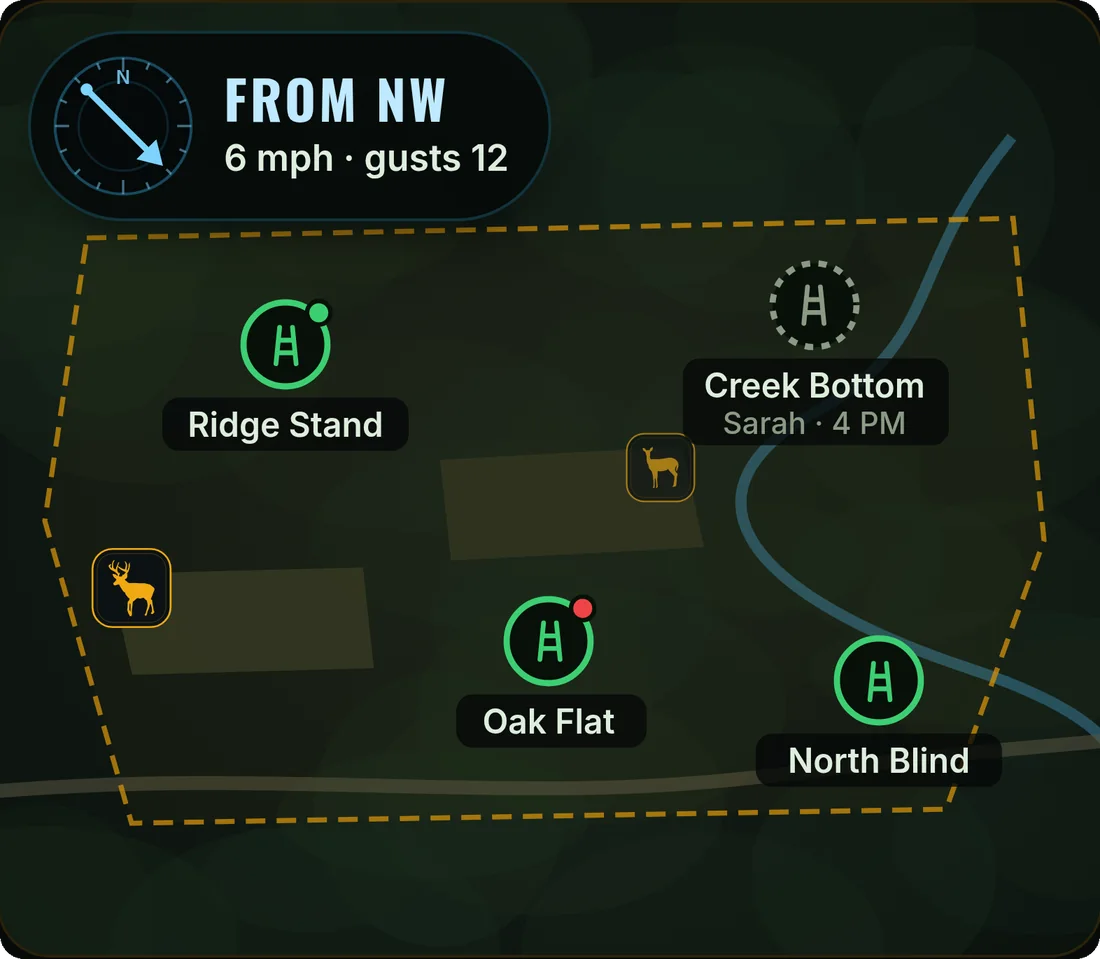
// 03 · Wind fit
Is today’s wind right for this stand?
A small dot on each stand answers it, based on where your deer actually come from.
- Green: good wind here. Your scent blows away from where deer usually come in.
- Red: wrong wind today. Your scent heads toward them. Pick another stand or wait for a change.
- No dot yet. A stand earns a dot after 10 or more sightings from one side. Until then, we don’t guess.
Tap a stand and its card says it in words, like “Wind: good, your scent goes away from them.”

// 04 · Today
Should I go? Answered first.
Today opens with one short brief: a score out of 10, the window you’re in or the next good one, and why. Weather, where you are in the rut, the week ahead and the moon are right below it.
- The brief up topA 0–10 score and the hours to be in the stand, with a plain-English reason.
- Sun and moon, done rightReal solunar major and minor times, moonrise and moonset, and a 3-week moon graph.
- Weather that moves deerRain chance, cloud cover and the pressure trend, not just the temperature.
- First legal lightFirst and last light for your location, so you know when the clock starts.
Scores are advisory. Wildlife doesn’t read forecasts.

// 05 · Season outlook
Rut timing for where you hunt
Where you are in the rut comes first: the phase, the peak dates for your camp’s area and how many days until peak. Everything else is a tap away.
- Rut timing by locationBased on state wildlife agency rut studies, and the screen names its source. Some regions are approximate, and the app says so.
- Your camp’s peakKnow your ground better? A camp owner can set the camp’s own peak dates.
- Best weeks aheadThe week worth taking off, week by week to the end of the rut, plus AM and PM scores for the next 8 days.
Rut timing in 25 states today
- AL
- AR
- FL
- GA
- IA
- IL
- IN
- KS
- KY
- LA
- MI
- MN
- MO
- MS
- NC
- NY
- OH
- OK
- PA
- SC
- TN
- TX
- VA
- WI
- WV
// 06 · Camps, clubs & leases
Run the whole camp from one map
Camp shows who’s on a stand, who’s at camp and who’s coming, first thing. Owners set the land, stands and rules once, and members and guests see the same map.


Property lines in a tap
Tap your land and the app pulls the outline from county parcel data, or draw it yourself. Lines are approximate, not a survey.
Stands & reservations
Place every stand on the map. Hold one for a day so nobody doubles up, and answer stand requests with a tap.
Camp chat
Group messages, with sightings and check-ins dropping in as cards you can open on the map.
Invite codes
Share a code or QR to bring members in. Guest passes end on their own.

Rendering of the Build 15 app from its code · sample data
// 07 · Two ways to use it
Same app. Your way around it.
Pick a style the first time you open the app. Every feature is in both, and you can switch anytime from the Style row on Me, which also keeps your season so far, your licenses, your camps (and Start a new camp for another lease or property) and your settings on one screen.
Guided buttons
Big, clear labels that walk you through each step.
Tap & swipe
Tap anything, swipe to move fast. Fewer buttons, more map.
// 08 · Community sightings
See what’s moving, keep your spot to yourself
Log what you see in a few taps. Keep it to yourself, share it with your camp, or post it anonymously to the area feed so hunters nearby know what’s on its feet.
- Tap the spot, pick the animalOn the Hunt map, tap where you saw it and choose buck, doe, tom, hog and more. Time, moon phase and conditions are saved with it.
- Your camp sees itCamp sightings land on your camp’s map. You always see your own right away.
- Area feed with no locationHunters within 25 or 50 miles (your pick, 25 by default) see only what was seen and the exact day and time. No name, photo, note, pin or distance.
- Held until after dark in some statesIn KS, IA, PA, GA, MN, AK, NE and MT, your camp gets a location-free heads-up right away (“Todd saw a buck · 7:40 AM”) and the pin unlocks 1 hour after local sunset, following state rules on sharing game locations. Georgia hogs aren’t held. In Montana, trail-cam photos stay private.
- Keep privateFlip Keep private and the sighting is hidden from your camp. It still counts, anonymously and with no location, in the area feed.
- Report or blockLong-press or tap ⋯ on any post to report it or block whoever posted it. It disappears for you right away, and we review reports, usually within 24 hours.
Photos work today. Video clips are on the way.
Keep it honest: no false reports, and never post someone else’s stands, gate codes or location. Community rules → · What the area feed shares →
Log one from the map in four taps
-
1Tap “Saw something”It’s in the bar under the Hunt map. In Tap & swipe, press and hold the map right where you saw it.
-
2Tap where you saw itThe spot you tap is the sighting’s location, so your stand history knows which way it came from.
-
3Pick the animalOne tap logs it. Or open Full Report at that spot to add how many, what it was doing, a photo or note, and who sees it.
-
4Save itBucks and bulls get a quick “how big?” step. It lands on your camp’s map, with the time, moon phase and conditions saved.
One-tap drops are shared with your camp and, with no location, the area feed. To keep one from your camp, use Full Report and turn on Keep private.
// How it works
Three steps to the stand
Get invited
Request an invite here, or use the code your camp sent you.
Set up your camp
Name it, tap your land to bring in the property line (or draw it), and drop your stands.
Hunt it
Check the score, read the wind, tap your stand to check in, and come home.
// Join the beta
Get on the invite list
Free while we’re in beta. Testers install through TestFlight on iPhone or Google Play testing on Android. Tell us a little about how you hunt and we’ll send your invite.
Already invited? Open the tester guide →
What happens next
- We add you to the invite list. Nothing else gets sent until your invite is ready.
- We send invites in batches, camps first.
- Your invite email has the link to install the beta on your phone.
// FAQ
Straight answers
Is it free?
Yes, free during the beta. We’ll announce pricing before the public launch, and beta testers hear first.
When is the public launch?
After the beta. Join the invite list and you’ll hear first.
Where does the rut timing come from?
From state wildlife agency rut studies for the state and region your camp is in. Some regions are approximate, and the app labels them. A camp owner can set the camp’s own peak.
Does it work without cell signal?
The map and your last-loaded score stay on screen. Check-ins and messages send when you get signal back, so check in at the truck if the stand is a dead zone.
Who can see my stands and sightings?
Only your camp sees your stands, check-ins and camp messages. The area feed never shows a location, only what was seen and when. We don’t sell your data.
Do safety texts go out yet?
Not yet. During the beta, overdue alerts show inside the app for your camp. Text alerts to your emergency contacts switch on before the public launch. Keep telling someone your plan.
Are the property lines exact?
No. They come from county parcel data where it’s available, and they’re approximate, not a survey. Where it isn’t available, you draw your line in a few taps.
Which phones?
iPhone and Android. Beta testers install through TestFlight (iPhone) or Google Play testing (Android).